Meet the New O. Here's What We've Been Building.
Table of Contents
- Watch Our Weekly Ohai Walkthrough Here
- Why we rebuilt Ohai
- A home base that shows you what matters
- To-dos built for how households actually work
- A calendar that understands your whole family
- Daily Dump: start your day clear
- Talk to O the way you actually think
- Everything else O can help with
- What's coming next
- This is the beginning, not the finish line
We've been a little quiet lately. That's because we've been building.
Over the past few months, we went back and rethought a lot of things about Ohai. Not just how it looks, but how it works for a real household on a real Tuesday morning when everything is happening at once.
What we're launching today is the result of that work. It's not a finished product, and we'll be honest about that. But it's a meaningfully better starting point, and there's a lot more coming fast.
Here's what's new and why it matters.
Watch Our Weekly Ohai Walkthrough Here
Why we rebuilt Ohai
The old Ohai had features people loved. But something wasn't clicking for a lot of users.
People told us they loved the idea of Ohai but didn't always know how to use it. That one stuck with us, because Ohai was never meant to feel like something you have to figure out. The moment it adds to your mental load instead of lifting it, we've missed the point entirely.
So we asked ourselves a simple question: what would Ohai look like if it actually fit into a real household, for real people juggling real life? Not just for one person managing everything, but for everyone in the home.
That question drove everything you're about to see.
A home base that shows you what matters
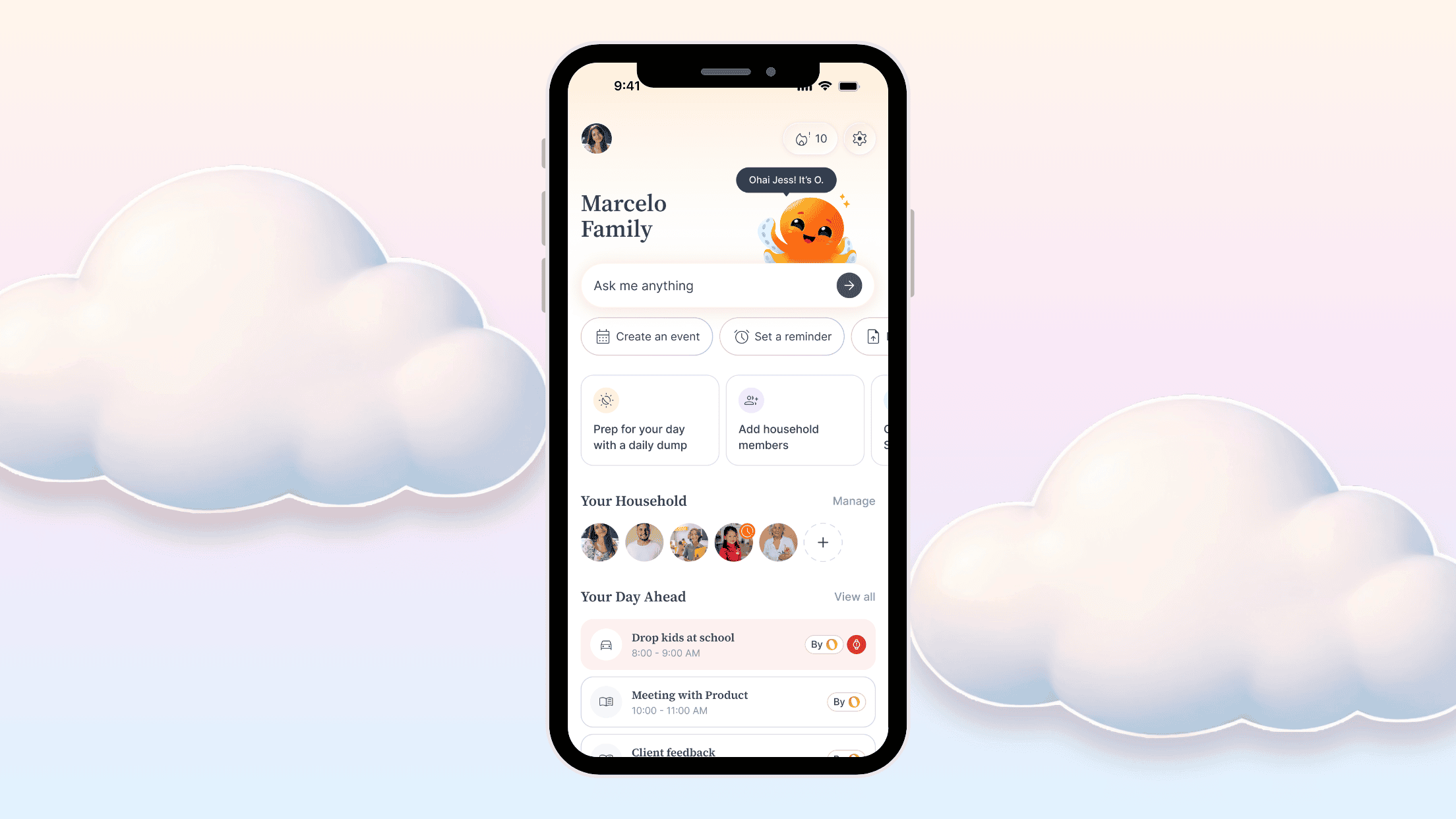
The new homepage is the first thing you'll notice. It's designed to give you a clear picture of your day without making you hunt for anything.
At a glance you'll see your upcoming events, today's to-dos, active reminders, and your household members. There are quick shortcuts to the features you use most, and O is right there ready to help whenever you need it.
It should feel obvious what to do next, because the best version of Ohai is one you don't have to think about.
To-dos built for how households actually work
This is the feature we're most excited to talk about, and it deserves a real explanation because it's different from what most people think of when they hear "task app."
Most task apps are built for one person managing their own productivity. Tools like Notion, Todoist, or Motion are powerful, but they're built for work, not for the reality of running a home. They come with a learning curve, a feature set that can feel overwhelming, and no concept of shared household ownership.
Ohai's to-dos take the best parts of those tools and strip away everything that doesn't belong in a household context. The result is something simple enough that anyone in the family can use it without a tutorial, but smart enough to actually shift responsibility around so one person isn't holding it all.
Here's how it works.
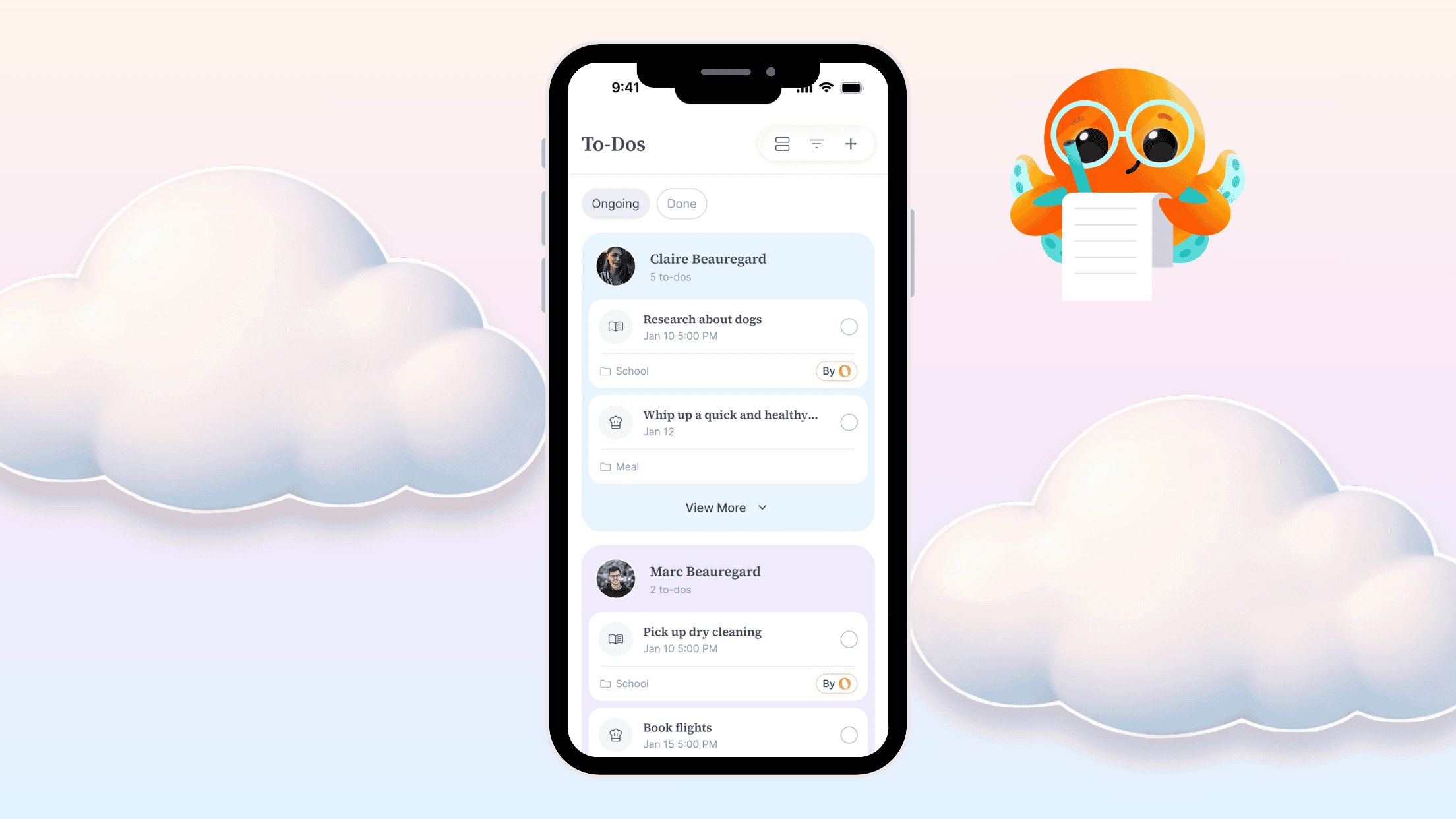
You can view your household's tasks as one unified list or grouped by person. Either way, the most urgent things surface first. Overdue items show up in red. Completed ones move to a done section so the active list stays clean.
You can assign any task to yourself, your partner, your kids, or anyone in your household. Set a due date and O will send them a reminder automatically. No follow-up from you required.
You can also organize tasks into folders, filter by category (school, meals, health, transportation, and more), and filter by due date so you can focus on just what's relevant right now.
This is just the starting point. The to-dos feature is going to get better week by week, and we're planning a dedicated blog post and video walkthrough to show you exactly how to get the most out of it. More on that soon.
A calendar that understands your whole family
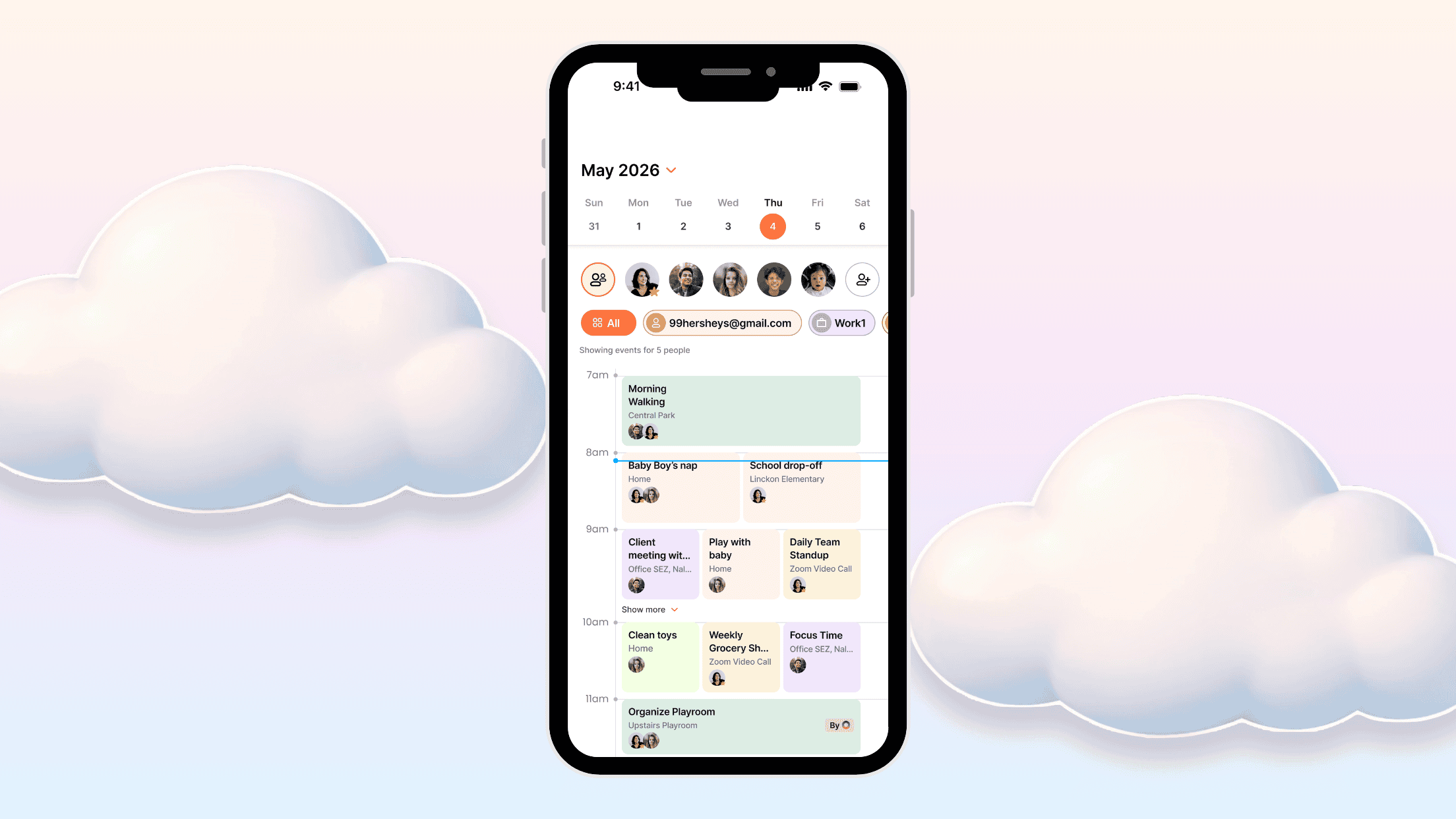
The new Light Calendar is a unified view of everything happening across your household. Events from connected calendars like Google or Outlook, events created manually, events pulled from emails and documents: they all live in one place.
Every event gets automatically categorized. Health appointments, school events, extracurriculars, travel, household tasks, meals, social plans. The categories aren't just labels, they're how the calendar helps you filter down to what actually matters to you in a given moment.
You can view by day, week, or month. You can filter by family member or by category. And the calendar is color-coded by person, so at a glance you can see whose week is packed and where things might be colliding.
Daily Dump: start your day clear
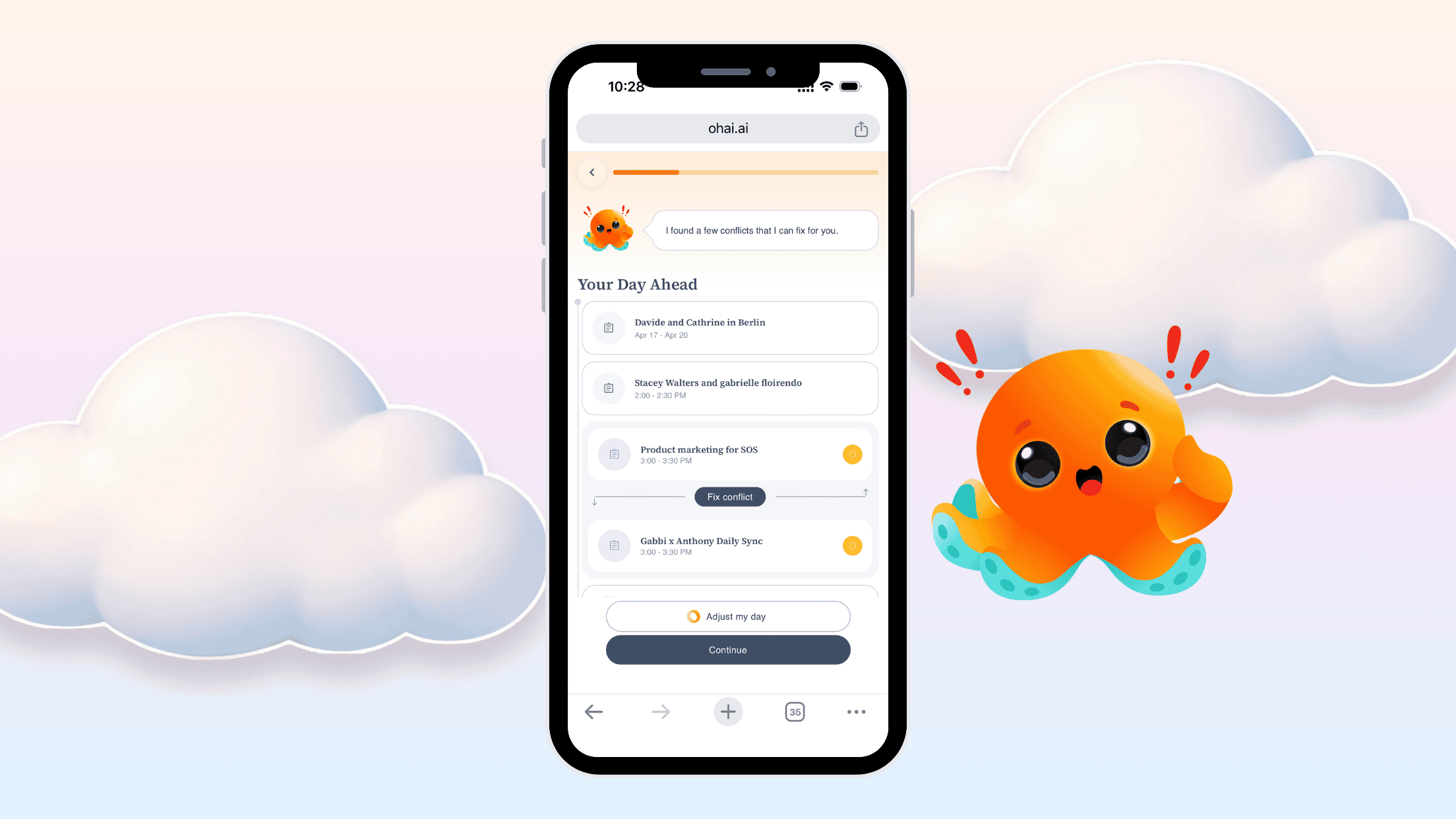
Daily Dump is our name for the quick morning check-in that keeps you from getting ambushed by your own schedule.
When you open it, O gives you a summary of the day: events, tasks, reminders, conflicts, and even the weather. Then it walks you through each section so you can deal with anything that needs attention before your day starts moving.
Conflicts show up highlighted so they're easy to spot. O can suggest a fix right there in the flow. You can check off tasks, clear reminders, and adjust your day, all without bouncing between different parts of the app.
There's also a streak. Every day you complete Daily Dump, your streak grows. It's a small thing, but building the habit of starting your day with a clear head instead of just reacting to whatever lands first makes a real difference over time.
Talk to O the way you actually think
One of the most requested features from parents was simple: the ability to just talk. Not type, not navigate, just say what's on your mind before it slips away.
You're breastfeeding, you're driving, you're in the middle of making dinner, and you suddenly remember three things that need to happen. That's exactly what voice mode is for.
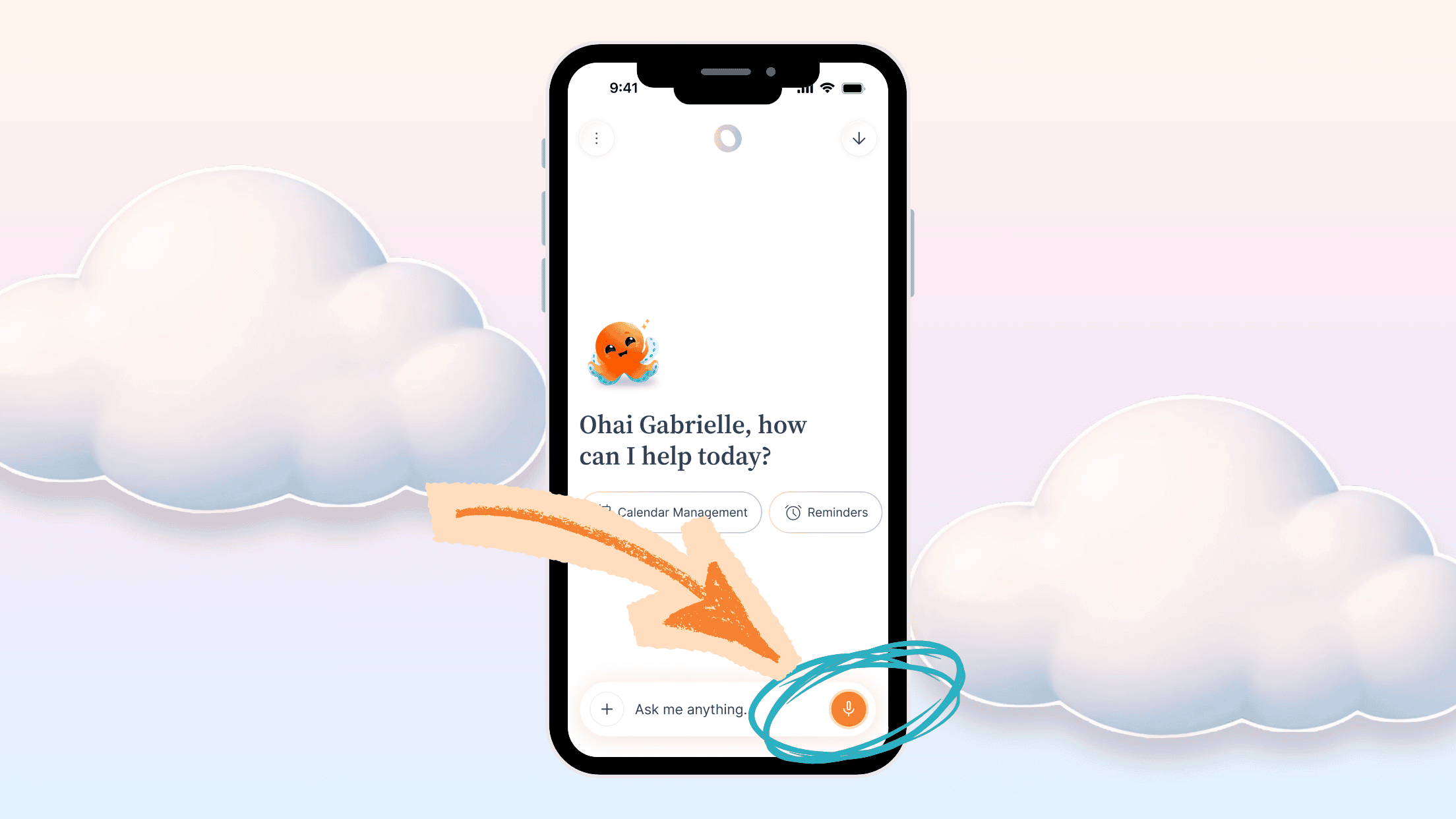
Tap the microphone, do a full brain dump, and O will sort it out. It responds in both audio and text so you can keep moving without stopping to look at your phone.
When you do want to type, the chat works just as naturally. You don't need to navigate to the right screen or learn any commands. Just say what you need and O handles the rest.
Some examples of what you can do right now:
"I'm having lunch with John on Monday." O will confirm the time, create the event, and ask if you want a reminder.
"I need to call Judy." O creates a task called Call Judy.
"Remind me to pick up the prescription tomorrow at 3." Done.
"What do I have today?" O gives you a rundown of your schedule.
You can also upload a document or photo in chat and attach a specific instruction at the same time. "Here's the school newsletter. Add all the dates for 3rd grade students to my calendar." O processes it and creates the events directly from what it finds.
Previously you could upload a doc, but you couldn't attach a specific request to it at the same time. Now you can.
The Chat with O button is available almost everywhere in the app, always one tap away. You never have to leave what you're doing to take an action.
Everything else O can help with
If you're newer to Ohai, here's the quick version of what else O can handle:
Doc scanning. Upload a school newsletter, a flyer, or any PDF and O extracts the key dates and to-dos and adds them to your calendar or task list automatically.
Email scanning. Forward emails to O and it pulls out what you actually need to act on. You can share your unique Ohai email address with schools, clubs, and organizations so their emails route to O directly.
Reminders. Tell O what you need to remember and when, and O will nudge you at the right moment.
Lists. Shopping lists, packing lists, gift ideas for birthdays or the holidays. Build them with your household so everyone can pitch in and nothing gets missed.
Memory. Tell O things once and it remembers. Your kids' allergies. Your preferred brands. Your family's routines. O factors that in without you having to repeat yourself.
Local calendar sync. Enter your zip code and add your local school calendar or community events to your Ohai calendar in seconds.
Meal planning. O can suggest recipes, build ingredient lists, and organize a shopping list by grocery section.
Explore. Not sure where to take the kids this weekend? Looking for a family-friendly restaurant nearby, a road trip idea, or help planning a vacation? Just ask O. It looks things up for you and comes back with a real plan, not just a list of links to dig through yourself.
What's coming next
A few things on the roadmap worth knowing about.
Smart Ohai Sync (SOS) is the one we're most excited about. Right now, staying on top of what's coming requires you to forward emails or upload documents manually. SOS changes that.
O will automatically scan your inbox, your school apps, and your sports apps, pull out what matters, and route it to the right person in your household. A practice schedule change gets added to the calendar for the kid who plays soccer. A school event lands where it belongs. O figures out who it applies to so you don't have to.
We'll be sharing more details in the coming weeks, and there will be a way to get early access when it's ready.
We're also building a live in-app tutorial, more household coordination features, and ways to make O feel even more personal to your specific family over time.
This is the beginning, not the finish line
What we're launching today is better than what was here before. It's also still a work in progress. We're building in public, alongside you, and a lot of what's already here exists because you told us what you needed.
If something's working well, we'd love to know. If something's confusing, we'd love to know that even more. And if there's something you wish O could do, tell us. That's genuinely how the roadmap gets built.
You can leave feedback by tapping the feedback link in the app, schedule a quick call with our team, or email our Director Gabrielle directly at gabrielle@teamohai.ai. She reads every message and will personally get back to you.
Thanks for being part of this.
The Ohai team