AI Document Processing & Organization
Simplify Your Life with AI-Powered Document Management. Your AI Assistant for Scanning, Sorting, and Scheduling What Matters


Recommended by Thousands of Users










How Ohai.ai Turns Documents into Action
Ohai.ai reads and understands your paperwork, turning static documents into dynamic tasks, calendar events, or reminders. From form uploads to scanned flyers, it ensures nothing gets lost or forgotten.

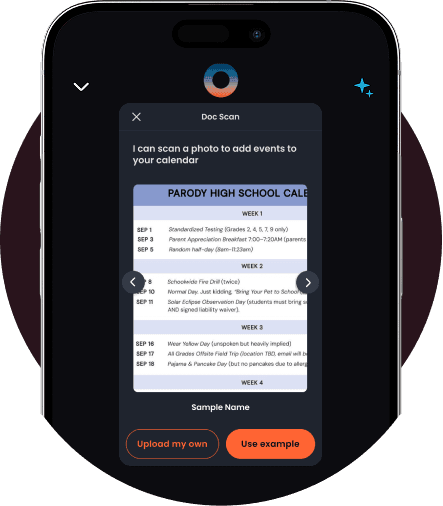
Capture and Upload Documents Effortlessly
You can upload PDFs, images, and screenshots directly into Ohai. Whether it’s a school form, doctor’s note, or flyer, O can recognize and store what’s shared in chat.
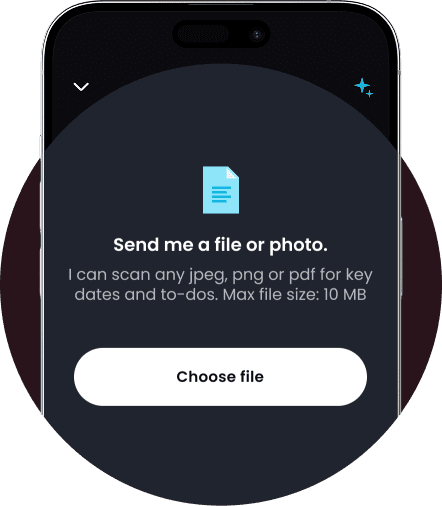
Review and Capture Key Info Together
Upload a document or screenshot, and O can help you pull out what matters. Just tell O what to note, like a date or task, and it can set a reminder, add it to your calendar, or create a quick to-do so nothing gets missed.
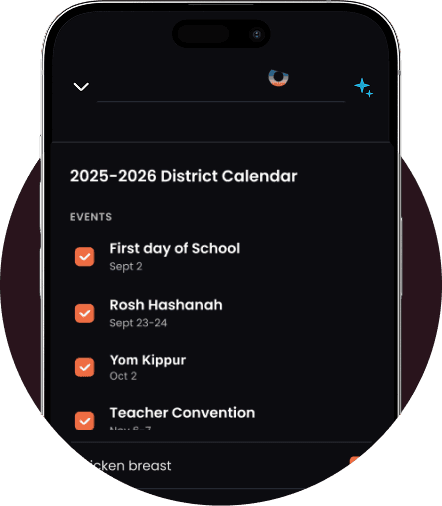
Smart Scanning That Understands Context
Upload PDFs, photos, or screenshots, and Ohai.ai automatically detects what’s inside, dates, names, deadlines, instructions, and organizes them instantly. School newsletters become calendar events; school syllabus into reminders; permission slips turn into to-dos.
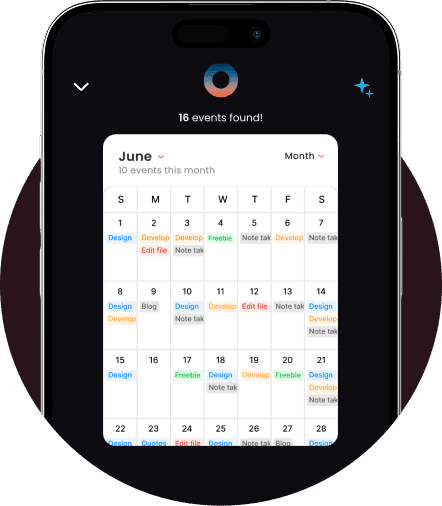
Easy Conversion to Calendar Events and Tasks
Skip the manual entry. Ohai.ai extracts key details from documents and syncs them across your connected calendars and to-do lists. A field trip flyer? It adds the date. A doctor’s form? It sets a reminder to schedule. Every document becomes an action.
Why AI Document Processing Matters
Households today handle dozens of documents each week, most of which contain tasks, dates, or forms that demand attention. Without automation, things fall through the cracks. Ohai.ai eliminates that stress by reading, categorizing, and scheduling every piece of paper that enters your world.
How It Works
Ohai.ai combines computer vision and language understanding to process your documents in seconds. Upload or snap a picture, and it does the rest, extracting key information, organizing it, and syncing it with your calendar or task list.
What Families Are Saying
From school forms to medical paperwork, Ohai.ai takes the stress out of document organization. Families say its AI-powered document processing helps them keep everything in one place, find what they need instantly, and turn clutter into clear next steps. Here’s how real users describe the peace of mind it brings.


The feature that allows you to send a picture or email of complicated schedules to Ohai and quickly organizes those schedules onto your calendar is a legitimate game changer.
KateFar16, App Reviewer
I can send Ohai event details to add to my calendar, whether they're texts, images, or PDF school calendars.
Ruship11, App Reviewer
I can forward emails and documents which are summarized with choices to create events, set reminders and forward to my other contacts. Huge time saver for me.
mongkebiz, App Reviewer
Take Control of Your Paperwork with AI Document Processing
From household forms to work receipts, Ohai.ai makes organizing documents effortless. With intelligent scanning, instant categorization, and built-in reminders, you’ll never miss a deadline or miss an important deadline again.
Frequently Asked Questions About
AI Document Processing
What is AI document processing?
AI document processing uses artificial intelligence to read, understand, and organize your files automatically. With Ohai.ai, you can scan or upload documents, like school forms, receipts, or event flyers, and the AI extracts key details such as names, dates, and deadlines to keep you organized.
Can Ohai.ai read PDFs and images?
Yes. Ohai.ai can process PDFs, screenshots, scanned images, and even handwritten notes. It recognizes important information like due dates, times, and instructions and turns them into tasks or calendar events automatically.
How does Ohai.ai make documents actionable?
Instead of just storing your files, Ohai.ai analyzes them and suggests next steps, like adding an event to your calendar, setting a reminder, or creating a to-do. You approve each action so your documents become useful plans, not just clutter.
Can it handle multiple types of documents?
Absolutely. Ohai.ai supports school newsletters, permission slips, hotel bookings, flight itineraries, invitations, medical forms, and more. Each file is processed intelligently, categorized automatically, and easy to find later.
Can I search for a specific document later?
Yes. You can ask Ohai.ai to find documents by name, topic, or keyword, for example, “Show me last month’s grocery receipts” or “Find the field trip form.”
Does it connect to my calendar?
Yes. Ohai.ai links with your connected calendars to automatically add events and reminders from uploaded documents, ensuring nothing gets missed.
What if my document includes multiple events or deadlines?
Ohai.ai recognizes multiple items in a single file and separates them automatically, creating individual calendar entries or tasks for each one.
Can I share processed documents with my family or Circle?
Ohai.ai recognizes multiple items in a single file and separates them automatically, creating individual calendar entries or tasks for each one.
Can I share processed documents with my family or Circle?
Yes. Once uploaded, you can add the events to a shared circle calendar so that the whole family gas visibility on the added events. Or a list from doc scan can be shared too with them.
How does Ohai.ai differ from a regular scanner or cloud drive?
Traditional scanners only digitize. Ohai.ai understands context, extracting data, creating reminders, and integrating directly with your calendar system, so every document turns into something actionable.
Ready to Simplify Document Organization?
Ohai.ai turns scattered paperwork into clear, actionable next steps. From scanned forms and school flyers to uploaded PDFs and photos, O helps you capture, store, and act on what matters,without the clutter. Try Ohai.ai today and see how effortless document management can be.