Smart Ohai Sync (SOS)
Stay Ahead of Every School, Sports, and Home Update with a Unified AI-Powered Hub. Your AI Assistant for Consolidated Schedules, Automatic Updates, and Seamless Family Coordination.

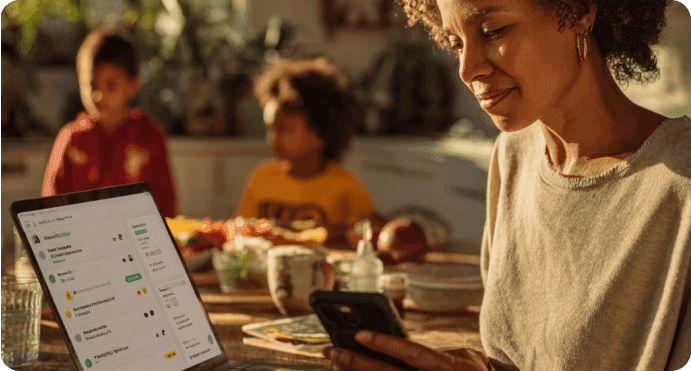
Recommended by Thousands of Users










How Ohai.ai Simplifies Your Family’s Schedule
Smart Ohai Sync connects with the apps, platforms, and sources your family already uses, pulling every update, change, and reminder into one unified hub. No more checking multiple apps, searching group chats, or digging through newsletters. Ohai organizes everything automatically, so your household runs smoothly without the manual work.

Automatic Sync Across School, Sports, and Home Apps
Connect your calendars, sports apps, and key household platforms once, and Ohai.ai handles the rest. New games, updated practice times, school reminders, and household plans appear automatically in your unified view, keeping everyone informed without juggling multiple apps.
Real-Time Updates for Every Change
School schedules shift constantly. Ohai.ai connects directly to your school’s announcements, updating automatically when new events are added or dates change. Once connected, Ohai tracks updates in real time and keeps your family calendar synced, no manual work required.
Smart Summaries and Actionable To-Dos
Smart Ohai Sync turns scattered updates into clear, useful steps. When Ohai detects something new, it can suggest exactly what to do next, such as adding a game to your calendar, preparing for a class event, or confirming pickup plans. Everything becomes actionable so your family is always prepared.
Add to Your Circle Calendar
Review and confirm which updates, events, and reminders you want to add to your shared Ohai Circle Calendar. Once approved, they appear instantly for everyone in your Circle, giving the entire household visibility without extra coordination.
Why Smart Ohai Sync Matters
Managing family schedules across school apps, sports platforms, email threads, and home routines is overwhelming and easy to get wrong. With multiple sources sending updates at different times, important details slip through the cracks. Smart Ohai Sync keeps your entire household informed, aligned, and prepared automatically.
How It Works
Smart Ohai Sync consolidates schedules across all your apps, emails and newsletters, making coordination across school, sports, and home effortless.
What Families Are Saying
Parents told us their days are spent checking multiple apps, digging through emails, and entering updates by hand. These are the real pain points shared by families who joined the pilot. Their experiences are guiding how we build Smart Ohai Sync, and you can help shape it too by signing up!


Checking all apps, calendars, messages and emails that gather all of the information.
Harisha
All of the info lives in different places and you can’t share to or from our kids school Google accounts/calendars.
Jenna
Too many websites to gather info to put into my calendar. It consumes a lot of time.
Ericka
Simplify Family Coordination with Smart Ohai Sync
Ohai.ai keeps your household aligned across school updates, sports schedules, and home routines. With automatic syncing, real-time summaries, and one shared view for everyone, you always know what’s coming next without switching between multiple apps or inboxes.
Frequently Asked Questions About Smart Ohai Sync
What is Smart Ohai Sync?
Smart Ohai Sync connects the apps, calendars, platforms, and sources your family already uses into one unified hub. Ohai.ai automatically scans for updates, organizes events, and syncs changes so you never have to switch between tools to keep your household organized.
How do I connect my apps and calendars?
During setup, you select the apps, calendars, and sources you want Ohai to access, such as sports apps, school calendars, or email-based updates. Once connected, Ohai pulls relevant information into your unified view automatically.
Can I choose which updates get added?
Yes. Before syncing items, you can review upcoming games, practices, school events, assignments, or household updates and choose what to include. O then adds your selected items in bulk.
Does Ohai update my calendar automatically when things change?
Yes. When a schedule shifts, a coach updates a practice time, or a new school reminder appears, Ohai detects the change and updates your unified calendar automatically. You can also receive alerts about new or modified events.
Can Ohai create reminders based on synced updates?
Yes. O can set reminders or to-dos for any synced item, such as preparing for a game, confirming pickup plans, or remembering an assignment deadline.
Can I connect multiple apps or sources at once?
Yes. Families can link multiple calendars, sports platforms, newsletters, and email sources under one household. Ohai keeps everything organized in a single view.
Who can see synced updates in my household?
Anyone in your Ohai Circle can view the unified schedule. Parents, caretakers, and grandparents can all access synced events and updates so everyone stays aligned.
Do Circle members need a Premium account to view synced items?
No. Basic Circle members can view and receive updates from the shared calendar. Premium features apply only to creation, editing, and advanced management.
How often does Ohai check for updates?
Ohai checks for changes regularly and reflects new events, updates, time changes, or cancellations as soon as they appear in your connected sources.
Can I create tasks or to-dos from synced events?
Yes. You can ask O to create tasks, reminders, or prep lists directly from any synced event. For example, “O, remind me to pack sports gear for Saturday.”
Is my data secure when connecting apps and calendars?
Yes. Ohai.ai uses a privacy-first model. You choose which apps, calendars, and sources to connect, and Ohai only accesses the information you authorize. Your data stays private within your household account.
What if the app or source I use is not supported yet?
If a platform or source isn’t available during setup, you can contact Ohai support to request integration. New connections are added regularly.
How do I get started?
Visit the Ohai.ai setup page, select the apps and sources you want to connect, review which updates to include, and confirm. Ohai will sync your information automatically and keep your family aligned across school, sports, and home.
Ready for a Unified, Stress-Free Schedule?
Smart Ohai Sync organizes the moving parts of family life into one seamless experience. From school updates and sports schedules to home routines and shared reminders, O keeps everything aligned without the constant app-hopping and manual tracking. Join the waitlist today and streamline your family’s day from the start.