AI Household Collaboration Tools
Stay Connected and Coordinated with AI-Powered Household Collaboration. Your AI Assistant for Shared Schedules, Tasks, and Everyday Communication


Recommended by Thousands of Users










How Ohai.ai Helps Families Collaborate Effortlessly
Ohai.ai centralizes the moving parts of family life, combining shared calendars, task lists, reminders, and messaging into one organized system. Everyone stays aligned, accountable, and informed without endless texts or confusion.

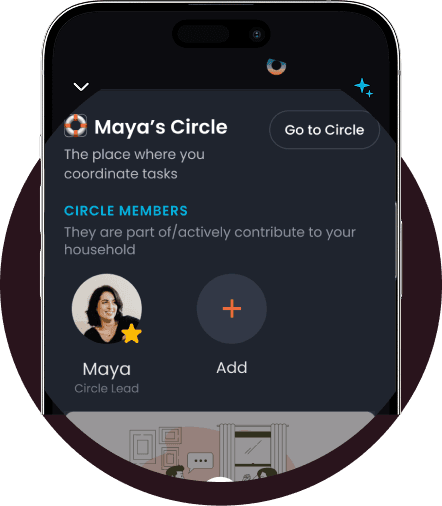
Shared Calendars, Lists, and Responsibilities
No more juggling separate apps or wondering who’s doing what. Ohai.ai connects everyone’s calendars, to-do lists, and reminders so everyone knows what’s happening and when.
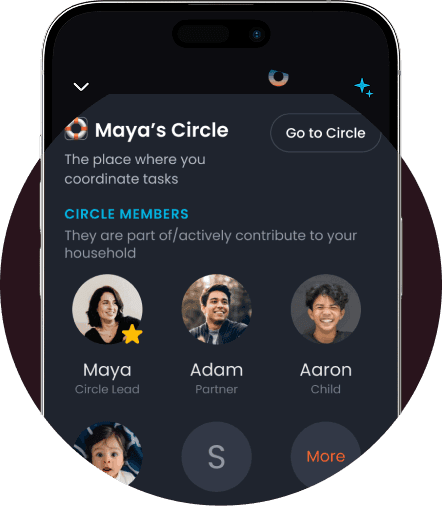
AI-Powered Task Distribution
Ohai helps you delegate tasks when you’re busy or unavailable. If you have a schedule conflict, like a school pickup or grocery run, you can ask O to suggest someone else in your Circle to handle it. O will message them directly to confirm, so responsibilities get shared without the back-and-forth.
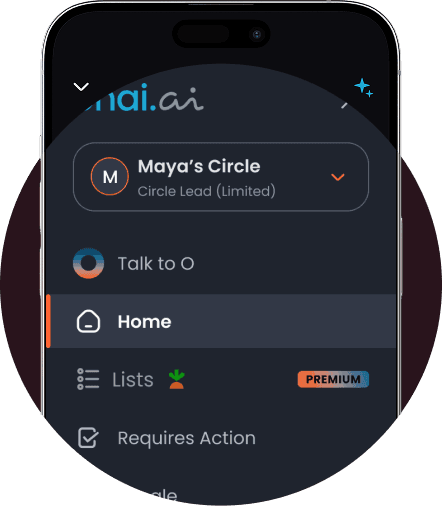
Shared Circles & Real-Time Access
Each household member can join a shared Circle to stay aligned across calendars, lists, and reminders. Circle Leads can manage events and tasks, while Premium members unlock full access to Ohai’s features. With a shared Ohai email, anyone can forward invites or updates directly into the Circle calendar, keeping everyone connected without extra coordination.
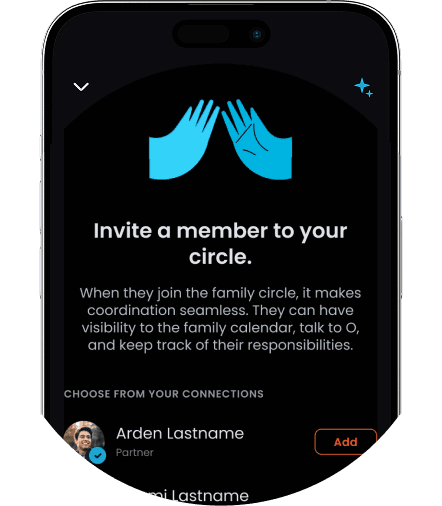
Invite and Connect Your Circle
Ohai.ai makes household coordination seamless by letting you invite family members, partners, or caretakers to your shared Circle. Each person gets access to the family calendar, can chat with O, and track their own responsibilities. Share your secure link or add members directly from your contacts to get everyone connected in seconds.
Why Families Need AI Collaboration Tools
Modern households juggle dozens of shared responsibilities every day, from carpools to meal planning. Without coordination, things fall through the cracks. Ohai.ai brings structure and simplicity to shared living by automating communication, and ensuring nothing gets overlooked.
How It Works
Ohai.ai connects every member of your household through an intelligent collaboration system designed for real life.
What Families Are Saying
From shared chores to family projects, Ohai.ai brings everyone together with AI-powered household collaboration. Families say it’s made teamwork easier, helping them delegate tasks, stay aligned on priorities, and communicate seamlessly without endless group texts or reminders.


Ohai has made a real difference in how we manage our hectic family life, especially with both of us working and three young kids with packed schedules. The app’s text reminders are a lifesaver, they keep us on track for everything from school pickups to swim lessons and speech therapy, so nothing slips through the cracks.
Warvill, App Reviewer
My calendar is always up to date and I set reminders for everything from medical appointments to reminding me what locker I put my stuff in at work. I can visibly see how my life and home are more organized since I started using Ohai.
nikkidactyl, App Reviewer
I love that I can send Ohai event details to add to my calendar, whether they're texts, images, or PDF school calendars. It’s helped my family stay coordinated without the constant back-and-forth.
ruship11, App Reviewer
Simplify Family Life with AI Household Collaboration Tools
From chores and calendars to reminders and routines, Ohai.ai helps households function smoothly. With real-time updates, shared task management, and AI-driven organization, your home finally runs like the team it is.
Frequently Asked Questions About
AI Household Collaboration Tools
What are AI household collaboration tools?
AI household collaboration tools help families, partners, and roommates stay organized by combining shared calendars, to-do lists, reminders, and messaging in one place. With Ohai.ai, everyone can coordinate schedules, share updates, and manage daily responsibilities from a single hub.
How does Ohai.ai help families stay organized?
Ohai.ai connects your household’s calendars, task lists, and reminders so everyone can see what’s happening and when. You can add events, assign reminders, and share updates with your Circle to keep communication simple and clear.
What is a Circle and how does it work?
A Circle is your shared household space inside Ohai.ai. You can invite family members, roommates, or partners to join. Each member can be added as a Basic or Premium Circle Member—Premium members get access to all of Ohai’s features and can share the same benefits as the account owner.
Can Circle members share the same calendar?
Yes. Once you create your Circle, you can choose a shared calendar that everyone can view, add to, or edit. This makes it easy to manage family events, appointments, and routines without needing multiple apps.
Can Ohai.ai assign tasks automatically?
Not yet. Ohai doesn’t assign tasks on its own, but you can ask O to help delegate responsibilities. For example, if you have a schedule conflict, you can say, “O, can you ask Alex to handle school pickup today?” and O will message them directly to confirm.
How do Circle members share events or dates?
Each Circle has a unique Ohai email that members can use to forward events, invites, or dates directly into the shared Circle calendar. It’s a quick way to make sure everyone stays updated without having to re-enter information.
Can I set shared reminders for my household?
Yes. You can create reminders for yourself or share them with your Circle. O can send pings or messages to remind everyone about important events, chores, or tasks, so you don’t have to follow up manually.
Can I chat with my Circle inside Ohai.ai?
Yes. Instead of using multiple group chats, you can message your Circle directly in Ohai. Chat naturally to coordinate plans, assign responsibilities, or confirm tasks, all within your shared household space.
What’s the difference between Basic and Premium Circle Members?
Basic members can view shared events, reminders, and lists, while Premium members have access to all Ohai features, including the ability to create, edit, and share new events, reminders, and tasks. Premium users essentially share the full Ohai experience.
Does Ohai.ai send real-time notifications?
Yes. Ohai.ai sends updates and reminders through in-app notifications or SMS, helping everyone stay informed when new events or tasks are added.
Can Ohai.ai integrate with other features like AI Task Management or AI Calendar Management?
Yes. Household collaboration tools connect seamlessly with AI Task Management, AI Calendar Management, and AI Reminders, so anything you assign or schedule in one area appears across your household’s shared workspace.
How do I get started with household collaboration in Ohai.ai?
Just create a Circle, invite your household members, select a shared calendar, and start assigning reminders or tasks. From there, Ohai keeps everyone in sync automatically.
Ready to Simplify Household Collaboration?
Stay Connected and Coordinated with AI-Powered Household Collaboration. Your AI Assistant for Shared Schedules, Tasks, and Everyday Communication